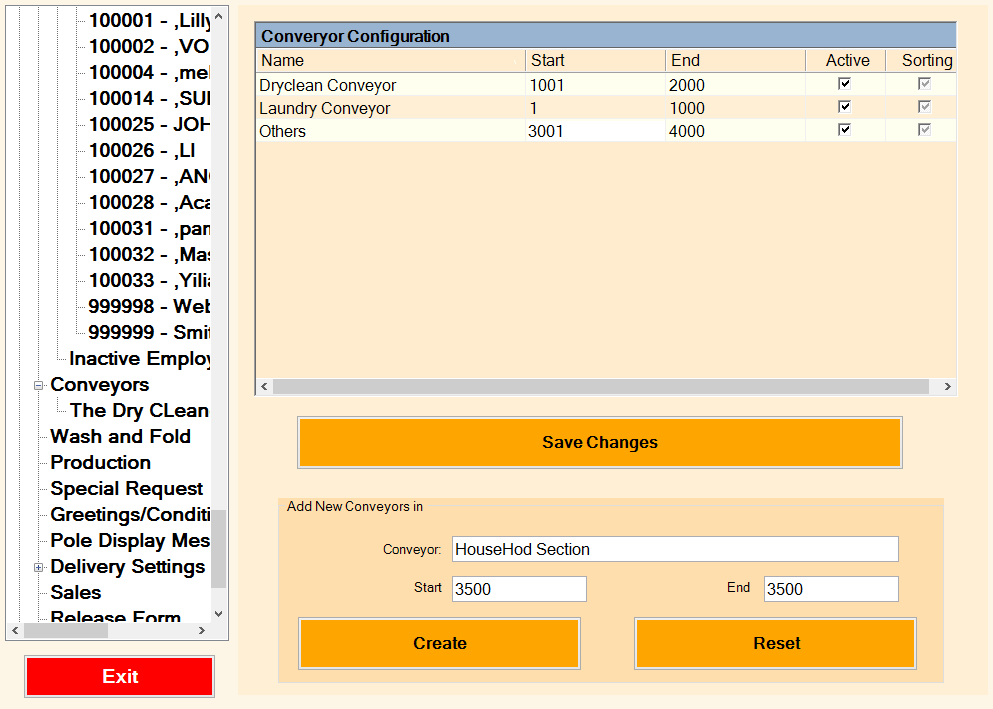
Conveyor table is used to configure your conveyor. This setting is used to display the name of the conveyor for the selected Conveyor location during Ready and Checkout process.
If your system is setup with Conveyor Controller It is also used to move the appropriate conveyor during checkout process.
For additional information on Conveyor Controller please visit CSI website.
To validate the conveyor location during Ready function, you may enable option called ‘Conveyor# Validation ‘ in Management -> System option.
Name - Lists the name of the conveyor here.
From - Lists the start number for the conveyor.
To - Lists the end number for the conveyor.
Active - Checkmark this box to make the conveyor active.
Add New Conveyors To setup a new conveyor, enter the following information:
Conveyor - Enter a conveyor name.
Start ID - Enter the start number for this conveyor.
End ID - Enter the end number for the conveyor.
Comments
0 comments
Please sign in to leave a comment.