Job class defines the authority level for each employee. To set up the different access levels, go to Management and the System drop down menu. Select Job Classes. If you want to update an existing job class, click the name and make the appropriate changes. If you want to create a new job class, click Add New Job Class, Enter Job-class title under Role (i.e Administrator) and enable proper option. You should setup different job-class like Manager, Clerk, etc with different authority level.
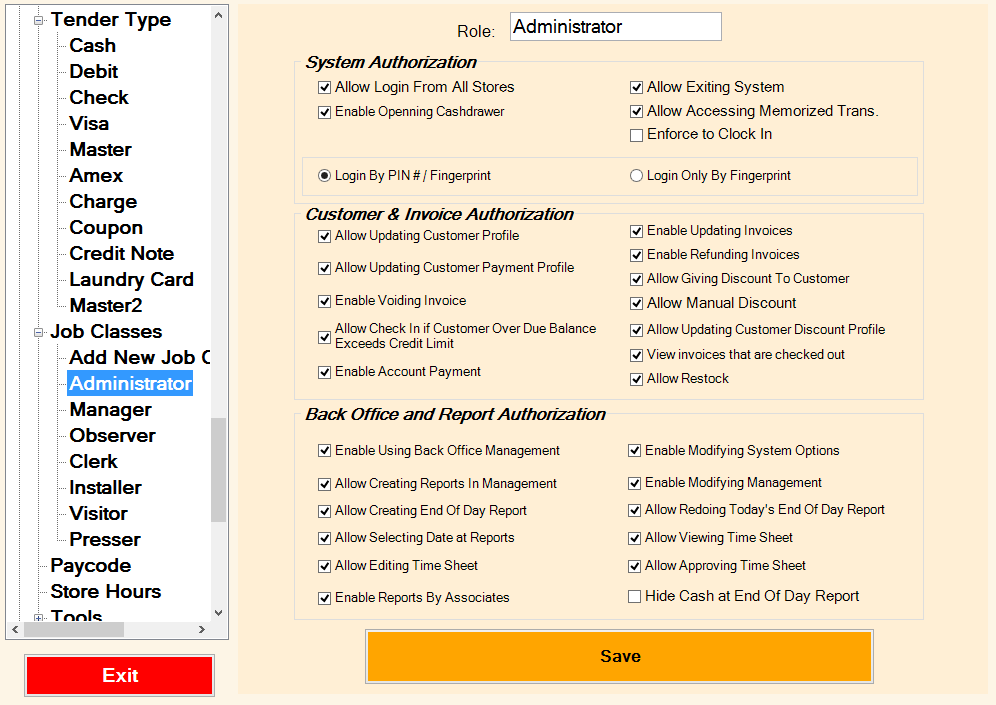
The following is the summary of each option for the job class screen:
|
System Authorization |
|
|
Allow Login from all stores |
This is used for customers with a multi store operation with a central database. Check mark this option if you like your staff to be able to logon from any stores regarding the working store in their profile. |
|
Allow Exiting system |
Checkmark this box if this employee can exit the system to Windows desktop. For security reason you may want to disable this option. |
|
Enable Opening cash drawer |
Checkmark this box if this employee is allowed to open the cash drawer for no sale option. You may get a report of No sales under History Tracking report. |
|
Allow Accessing Memorized Trans |
This option is used for Mat Rental to allow staff to access Memorized Transactions. |
|
Enforce To Clock In |
If you like to track employees time sheet, enable this option to enforce staff to clock in and clock out |
|
Login by Pin#/Finger Printer Reader |
Enable this option to allow staff to use either Pin# or Finger print to access the system. |
|
Logon Only by Finger Print |
If your system is equipped with Finger print/biometric reader enable this option to make your system more secure. That is staff with this job class can only access the system using Finger Print/Biometric reader. |
|
Customer/Invoice Authorization |
|
|
Allow Updating customer profile |
Checkmark this box if this employee is allowed to update the customer profile. |
|
Allow Giving Discount to the customer |
Checkmark this box if this employee is allowed to give discounts to customers. |
|
Allow updating customer account payment |
Checkmark this box if this employee is allowed to update the customer payment method, Tax Exemption etc. |
|
Enable updating Invoices |
Checkmark this box if this employee is allowed to update and make changes to invoices. |
|
Enable voiding Invoices |
Checkmark this box if this job-class is allowed to void invoices. |
|
Enable Refunding Invoices |
Checkmark this box if this job-class is allowed to refund invoices.
|
|
Allow associate to checkin customer with over Credit Limit |
Enable this option if this job-class is allowed to checkin a customer who is over their credit limit.
|
|
Allow Manual Discount |
Enable this feature, If you wish to allow manual $, or % discount to be given by this job-class. |
|
Allow Updating customer discount profile |
Checkmark this box if this employee is allowed to update the discount option in customer profile. |
|
Enable Account Payment |
Enable this option to allow staff process account payment in Invoice Utilities. |
|
View Invoices that are checkout |
This feature is used by some to disallow staff view invoices after being checked out. Why? |
|
Allow Restock |
If invoices are checked out by mistake you may use Restock option under invoice Utility to put it back into inventory. Enable this option to allow restocking. |
|
Back Office Authorization |
|
|
Enable using Back Office Management |
Set this option to allow this job-class to access back office section. |
|
Enable modifying system options |
Checkmark this box if this employee is allowed to modify system options. |
|
Enable Creating reports in management |
Checkmark this box if this employee is allowed to create reports in Management. |
|
Enable creating end of day report |
Enable this option if employee is allowed to Create End of Day reports. |
|
Allow redoing End Of Day |
Enable this option to allow managers to redo/reopen store if store/shift was closed by mistake. |
|
Allow selecting dates at reports |
Checkmark this box if this employee is allowed to select dates on reports otherwise only current date can be selected. |
|
Allow editing time sheet |
Checkmark this box if this employee is allowed to edit the Time Sheet to adjust the hours. |
|
Allow viewing time sheet |
Checkmark this box if this employee is allowed to view the Time Sheet under Reports. |
|
Allow approving time sheet |
Checkmark this box if this is a manager job-class and allowed to approve the Time Sheet to for others. |
|
Enable modifying management |
Checkmark this box if this employee is allowed to access management section of the back office.
|
|
Enable Reports By Associates |
Disable this option if you don’t want to allow staff to view each others report. |
|
Hide cash At End of Day |
For security reason you may want to enable this option, that’s staff closing the store/shift without knowing the total on-hand. During end of day process total cash in till is reported, and manager is responsible to balance. This feature is used to prevent staff from manipulating the cash on hand. |
Comments
0 comments
Please sign in to leave a comment.